
SurroundTraxx Now Shipping
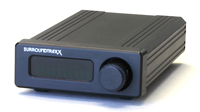 After finishing the revisions to the SurroundTraxx manual, we are proud to say that this item has started officially shipping out to stores this week.
 More information about SurroundTraxx can be found at www.soundtraxx.com/surround. The manual can be viewed online in the Manuals section of our website.
This revolutionary sound system allows full sound for any scale, and is ideal for N- and Z-scale models, which are typically difficult to equip with great sound due to the small speakers required. Instead of onboard speakers, SurroundTraxx allows you to use speakers of any size that are installed around your layout, and directs the sounds so that they appear to "travel" with your locomotives.
Other New Products Now Shipping
We have also been shipping out the TSU-1000 for Dual GE FDL-16 (P.N. 827124) for the GE U50 locomotive. This is the decoder to use for the new Athearn HO U50 locomotive available now in stores!The lighting decoder for the Blackstone Models Long Caboose (P.N. 810137) is now shipping as well. This is patterned to easily fit inside the Blackstone caboose, but can be used in many different styles of cabooses.
Be sure to see your local hobby shop or favorite dealer for more information and to order.
Blackstone Models Updates
We have some K-27s still available for pre-order as well. These are expected to arrive in February. The East Broad Top 3-Bay Hopper is still available if you have not yet placed your orders. We have received the pre-production samples and these are great-looking, excellent-running and reliable cars, synonymous with the name Blackstone Models!
Upcoming Trade Shows
Tech Tip: Setting Up Echo with SurroundTraxx

SurroundTraxx has the ability to model environmental sound effects to the sound in each zone, like reverb and echo (which are not the same thing). An example of this would be if part of the layout is set in the flatlands, while another portion is up in the mountains. In the mountain zone, a light echo can be reproduced to give the feeling of being in the mountains. Likewise, if the layout has a switching area with lots of buildings up against the track (an "urban canyon"), reverb would be more appropriate.
 For the example on how to do this, we’ll set up heavy echo in Zone 4 for the whistle, bell and exhaust.
To set up the amount of echo desired in the zone, press in the knob to get to the menu. Rotate the knob until AUDIO appears in the window, and then press the knob to select. In the window, SND ZONE:1 will appear. Rotate the knob until the desired sound zone is displayed, SND ZONE:4, then press the knob. Rotate the knob until ECHO: 0 is displayed in the window, then press the knob. Following the list in the SurroundTraxx manual on page 2:27, rotate the knob until ECHO:6 is displayed, then press the knob to save the setting. Repeat these steps for any other sound zones that this effect is desired in. When finished, rotate the knob until EXIT is displayed, then press the knob to return to normal operation mode.
Now, it is necessary to apply the echo to the individual sound effects as desired. Starting from the normal operation of SurroundTraxx, press the knob to display ROUNDHOUSE. Press the knob to select, then rotate until EDIT LOCO, and then press the knob to select. Rotate the knob until the road number or address of the desired loco to edit appears in the display, and then press the knob. Rotate the knob until WH FX appears. Press the knob to edit the whistle echo effect. This is where the percentage (0-255 = 0-100%) of the heavy echo selected in the audio menu will be applied to the selected sound effect. For heavy echo in the whistle, dial in 200, which is done by changing the individual digits. Press the knob to select each digit, make and save the change.
When finished with the whistle, move on to the bell. Rotate the knob to BL FX, press the knob to select, and enter 100 (we'll use this lower value since the bell is not as prominent as the whistle) by following the same procedure as was done for the whistle. Then rotate the knob to select EX FX and enter 125. Rotate the knob to EXIT and press the knob. Now run your loco through sound Zone 4. Blow the whistle and listen to the echo effect in Zone 4 and hear it gently fade out. Ring your bell and listen to the exhaust.
Repeat this procedure for each of the locos in your roundhouse so they all respond to the echo effect. Without setting up the FX in the loco profile, that loco will not give the echo effect in any zones.


No comments:
Post a Comment